Promoting Your Services
Driving patient appointments for your private services is essential for maximising your pharmacy's revenue and community impact. Our platform provides the digital tools to make booking seamless; your goal is to put these tools in front of your patients.
1. Accessing Your Booking Tools
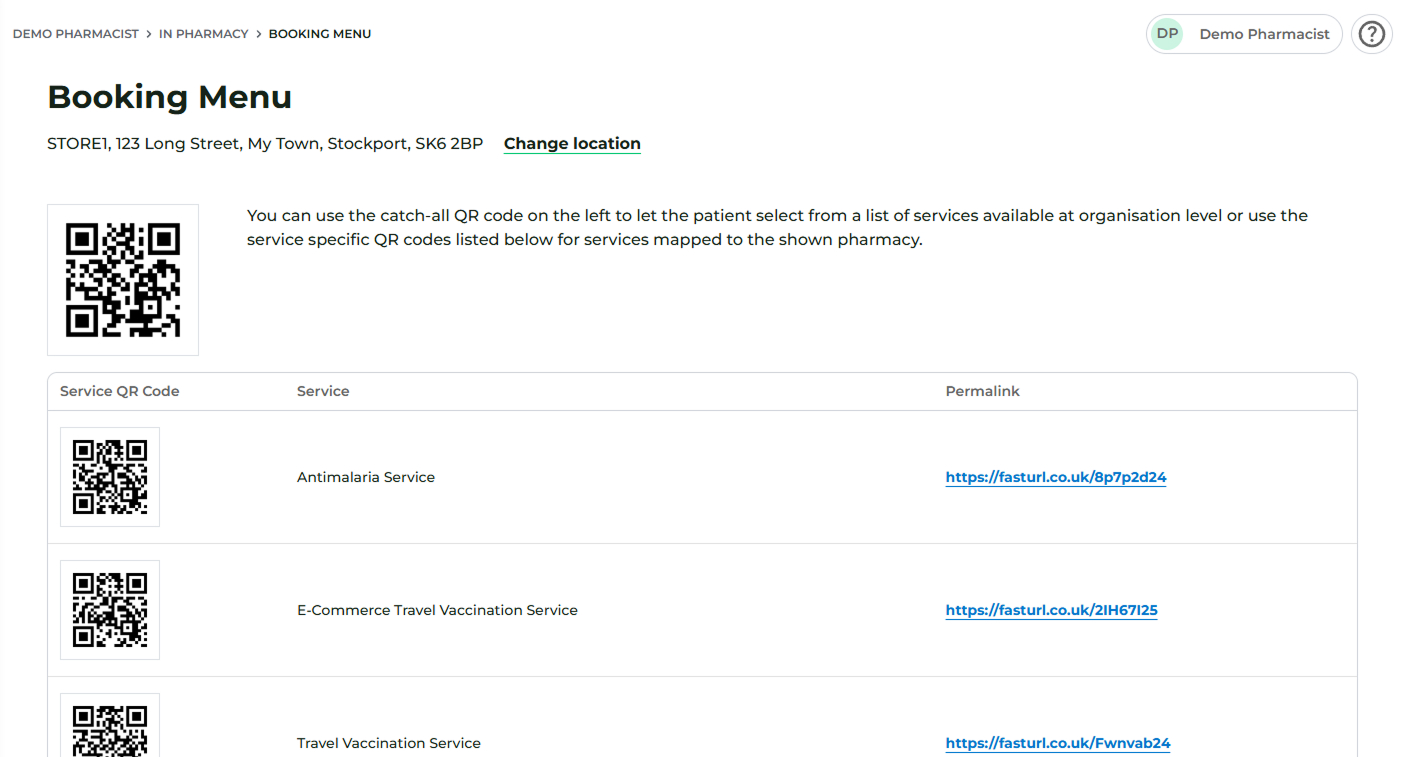
Every service you offer has a unique digital "front door." To find these, log in to a Pharmacist or Staff account and navigate to: In Pharmacy > Booking Menu
In this section, you will find:
- Individual Service Links: A specific URL and QR code for every service. This allows patients to view your real-time availability (based on the pharmacist’s calendar) and take payment securely if required.
- The ‘Catch-All’ QR Code: Located at the top of the page, this directs the user to a master menu where they can browse and select any service your organisation offers.
Pro Tip: To get the URL for your 'Catch-All' QR code, simply scan it with your smartphone camera. Once the booking page opens in your mobile browser, copy the URL from the address bar. You can then use this link in your digital marketing and social media bios.
2. Placing Service Links on Your Website
Once your services are live, the most effective way to drive bookings is to place your unique Service Links directly on your pharmacy’s website.
It is important to note that these are Group-Level Links. Unlike branch-specific links, these allow a patient to select the service they want first, and then choose their preferred pharmacy location during the booking journey. This keeps your website clean and your patient's journey simple.
The "Call to Action" (CTA)
You should place these links behind high-visibility CTA buttons (e.g., "Book Sore Throat Service" or "Start Weight Management Consultation") on your homepage or dedicated service pages.
"But my website isn't ready for this..."
We know that the "digital" side of pharmacy can feel like a minefield. If you're looking at your website and feeling a bit stuck, you aren't alone. Here are the most common hurdles we see—and how to clear them:
- "My website is basic and doesn't have pages for private services."You don't actually need complex, multi-layered pages. A single "Private Services" landing page with a list of CTA buttons linking to your Deltera services is often more effective than a cluttered site. Let the Deltera platform do the heavy lifting of the clinical journey.
- "I don't have access to my website or know how to make changes."If you have a web developer, simply send them your list of Service Links and tell them which buttons they should point to. If you manage it yourself via a CMS (like Wix or Squarespace), adding a link to a button is usually a two-click process.
- "My website is with a provider who won't make these changes."Some providers can be "protective" over their platforms or charge high fees for simple updates. However, adding a standard hyperlink to a button is a basic requirement of web hosting. If they are making this difficult, it might be time to review if your current provider is supporting your growth or gatekeeping your data.
- "I have no idea how many people actually visit my site."If you don't know your traffic numbers, you're "flying blind." You can't optimise what you can't measure. We recommend installing basic analytics (like Google Analytics) so you can see exactly how many people are clicking your "Book Now" buttons and where they are dropping off.
- "I'm facing a combination of all the above!"Start small. You don't need a digital overhaul today. Pick your most popular service (like Weight Management or Travel), add that one link to your homepage, and see the results for yourself.
3. Strategic Promotion Ideas
To ensure a steady stream of bookings, we highly recommend placing your links and QR codes across all patient touchpoints:
- Social Media: Post your booking links on Facebook, Instagram, or X to capture patients browsing online.
- In-Store Leaflets & Stands: Print your QR codes on physical marketing materials or counter-top stands so walk-in patients can book a future slot in seconds.
- In-Store Devices: If you have tablets or screens in your pharmacy, display the 'Catch-All' menu for patients to browse while they wait for prescriptions.
- Direct Outreach: If a patient gets in touch via email or phone, send them the direct booking link immediately to secure the appointment and reduce "no-shows."
4. The Gold Standard: A Professional Pharmacy Website
While QR codes are excellent for in-store conversion, the most effective way to grow your private services is through a dedicated, SEO-optimised pharmacy website.
The best experience for a patient is an end-to-end online journey:
- Discovery: They find your service via a Google search for an SEO-optimised page specific to your local area.
- Education: They learn about the benefits, eligibility, and pricing on a professional, trustworthy webpage.
- Conversion: They click a "Book Now" button which takes them directly to your Deltera booking link.
Why Choose Deltera for Your Website? We specialise in creating websites designed specifically for pharmacies with private services. Our sites are built to act as 24/7 sales tools, automating the booking process and reducing the administrative burden on your staff.
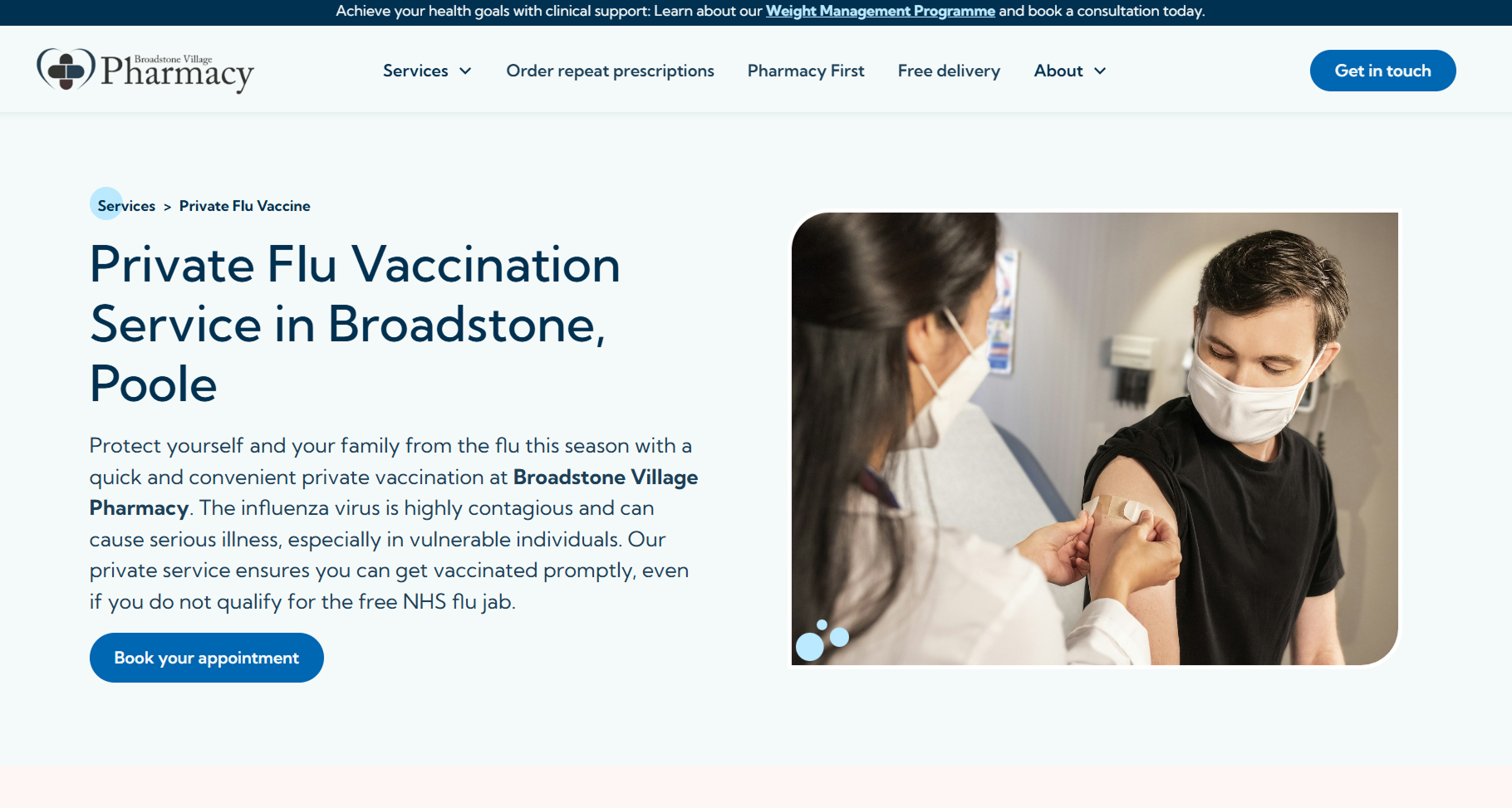
You can see an example of this in action with Broadstone Village Pharmacy, where we integrated their service descriptions directly with the booking platform for a seamless user experience.
Ready to upgrade your online presence?
If you're interested in our website services, we can help you build a digital presence that drives real growth.
- Learn more about our website services
- Get in touch: Contact us today to discuss a bespoke website build for your pharmacy.
